About
COGS is able to connect to DMX nodes that communicate over the network, and gives you one universe (512) channels.
<aside>
<img src="/icons/server_gray.svg" alt="/icons/server_gray.svg" width="40px" />
When choosing a suitable node, it must be ArtNet compatible and have DHCP support.
We would recommend these brands of devices, as they are known to work well:
- Chauvet DMX-AN2
- Showtec NET-2/3 Pocket
- Showtec NET-2/5 Pocket
</aside>
Connecting
- Make sure your DMX node is on DHCP mode and connected to the same local network as COGS software
- DMX also must be activated as a plugin within COGS (see: The DMX Plugin )
- Note the MAC address of the node (if you will have multiple connected on the network)
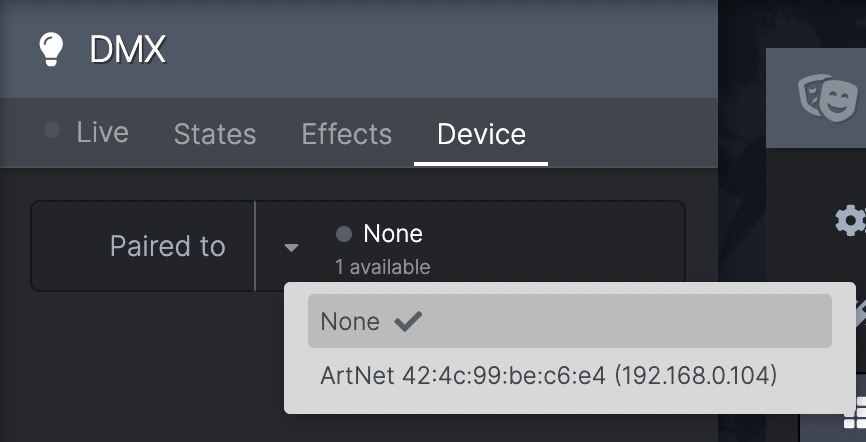
- Go to DMX-->Device
- Next to 'Paired to' it should say if any DMX nodes are available on the network
- If any are listed as available, click the dropdown and choose the MAC address of the node you want
- If none are available and you have connected a node, check the above steps and then reset it
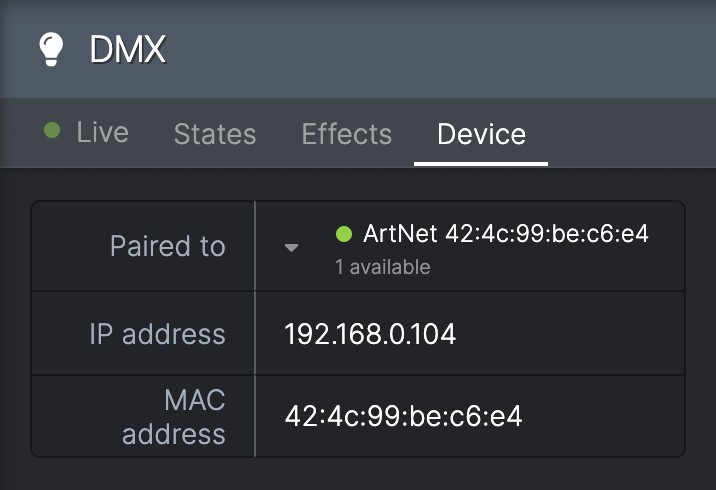
- When connected, the status circle goes GREEN and the IP & MAC address are displayed
- You can now connect the node to other DMX devices